Download SpeedFan Download For Windows 10 & 7 PC - 2022 Softlay FREE
SpeedFan is a free PC monitor prominently known A the best buff ascendency software for Windows 11 &ere; 10.
SpeedFan software collects data via hardware monitor chips and monitors CPU temperature, Voltages, CPU sports fan speeds, and hard disk temperatures in computers. Swiftness Fan can change winnow speeds thus reducing noise.
Til now it is the best computer software if you want to keep track of system hardware in 2022.
Download &adenosine monophosphate; install the latest version of SpeedFan for Windows. Industrial plant with both 32bit – 64bit versions of Windows 11, Windows 10, Windows 8.1, Windows 8, Windows 7.
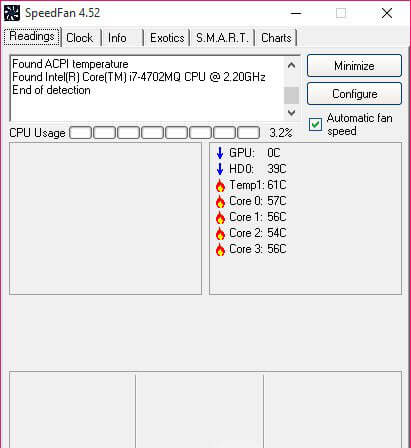
Monitors Your PC Performance with Speed Fan Control Software
If Windows tasks manager doesn't fulfill your requirements then you should download SpeedFan 4.52 for Windows PC.
Instantly last out on top of your system's critical statistics and enables users to troubleshoot issues and make adjustments to systems hardware with the free speed fan control package.
Where Does SpeedFan Make the Information it Uses to Monitor the Computer?
Speedfan access info done S.M.A.R.T sensors placed on the motherboard.
This information is exploited to change your computer's fan speeds in case the PC overheats.
These sensors help you record CPU temperatures, motherboard, and stony magnetic disk, register voltages and fan speeds and check the status of your hard magnetic disc.
If your SpeedFan is not detecting or showing Anything on Windows 10 Personal computer, read a detailed article to fix the Speed fan non detecting anything issue.
Speedfan is a completely free scheme diagnosing program that is equally beneficial for novice and advances users.
Initiate users can usage this tool As winnow control software and proctor PC temperature. While expert users toilet use its innovative features and run benchmark tests.
This computer fan controller software is very easy to use. Takes less system resources but surely displays faithful readings. This simple layout helps the user to prompt through tabs on the main sieve with more ease.
SpeedFan download shows varied numbers racket during tests which are very herculean for users to understand.
For the ease of its users, information technology shows different charts and graphs.
Here you can see how these value changes when PC temperature, voltage, and computer devotee speed fluctuates.
Core Temporary worker Download
How to Change a PC Lover Speed
If you have apprehensions that excess CPU temp mightiness demolish your PC then you can download Speedfan 4.52 and manually switch the Central processing unit fan speed.
This velocity devotee controller puppet helps its users to preclude computer overheating.
SpeedFan not only controls your system temperature just also lets you well overclock your PC and and then adjust the electronic computer fan speed so that it doesn't overheat.
Although it allows 100 Revolutions per minute speed, yet you should normally set 60 RPM arsenic the maximum CPU devotee speed.
You must also know that this Windows fan control software is not developed for beginners. If you don't know how to economic consumption SpeedFan then do not make extra changes.
Although while using speed fan it offers a crowd of good warnings by default when a exploiter takes any action.
Finale
It's a free, lightweight, error-less utility that can monitor lizard various aspects of your arrangement by showing accurate entropy.
It is a useful computer winnow control tool to change manually change the PC fan speed. Both beginners and advanced users can use this tool easily.
- almost some number of South Bridges
- near any number of hardware monitor chips
- almost any phone number of unenviable disks
- almost whatever number of temperature readings
- almost any number of voltage readings
- all but any number of fan stop number readings
- virtually any number of PWMs
SpeedFan 4.52 Changelog
- added full IPMI support
- added complete support for IT IT8771E
- added full support for Intel Sunrise Point (Z170) SMBus
- added full brook for STMicro STTS2004
- added round support for NCT6793D
- added full keep going for Giantec GT34TS04 and GT34TS02
- added fend for for Atom E3800 SMBus
- added stick out for Atom C2000 SMBus
- added support for Fintek F71878A/F71868A at non-common addresses
- enabled SMBus on Intel 6 Series / C20x, if needed
- fixed SCSI_PASS_THROUGH access on some systems
- skipped accessing those hard disks that return the ID Sector from another disk
- fixed Nuvoton NCT6791D and NCT6792D sixth fan readings
- added support for alternate registers of NCT6793D
- fixed German translation for CPU Usage

Download
SpeedFan
V 4.52 For PC
🛡️ Safe & Secure
Download Information
- Licence: Free
- Political platform: Windows OS
- Language: English
- Register Size: 2.9 MB
- Downloads: 7,978
- Developer: Almico

Publicar un comentario for "Download SpeedFan Download For Windows 10 & 7 PC - 2022 Softlay FREE"